Understanding Python Function Type Hints Explained Concisely

Type hints in Python functions serve as a critical bridge between developer intent and machine-assisted code verification, enhancing both maintainability and reliability. By explicitly declaring expected parameter types and return values, developers can transform abstract logic into self-documenting structures, reducing runtime errors and improving collaboration. This approach aligns with Python’s dynamic nature while leveraging static analysis tools to catch inconsistencies early, particularly in large-scale projects where clarity and precision are paramount.
The evolution of type hints—from optional annotations in Python 3.5+ to a cornerstone of modern Python development—reflects a growing demand for scalable, high-assurance codebases. Unlike traditional dynamic typing, which relies solely on runtime behavior, type hints introduce a declarative layer that benefits developers, IDEs, and automated testing frameworks. For instance, a function processing user input without hints may silently accept invalid data, whereas its annotated counterpart enforces constraints upfront, enabling tools like `mypy` to flag potential issues during development. This shift underscores a broader trend toward hybrid typing, where flexibility coexists with rigorous validation.

Type Hints for Python Functions: Syntax, Benefits, and Implementation
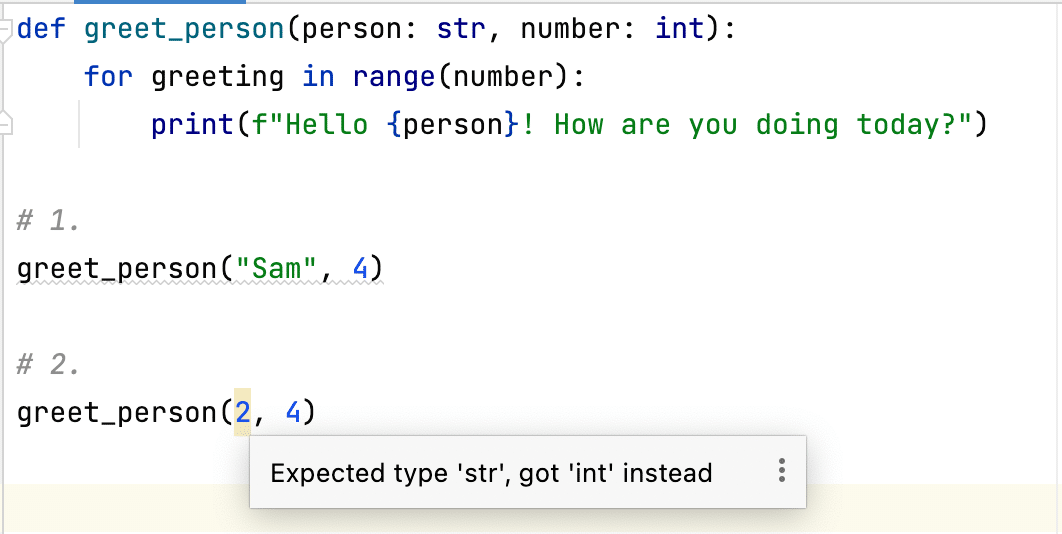
Python’s type hints, introduced in PEP 484 and expanded in subsequent PEPs (e.g., PEP 526, PEP 563), provide a way to explicitly declare the expected types of function parameters and return values. While Python remains dynamically typed, type hints serve as metadata to improve code clarity, maintainability, and tooling support. They enable static type checkers like `mypy` to detect potential type-related errors early, reducing runtime failures and enhancing collaboration in large-scale projects. Type hints do not enforce types at runtime but act as documentation and a bridge between Python’s flexibility and stricter static analysis.The adoption of type hints in functions follows a structured syntax that aligns with Python’s design philosophy, balancing readability with practicality. Below is a comparison of Python functions with and without type hints, highlighting their impact across key dimensions.
Comparison of Python Functions: With and Without Type Hints
Type hints introduce minimal syntactic overhead while significantly improving code comprehension and tooling integration. The following table contrasts the two approaches:| Aspect | Function Without Type Hints | Function With Type Hints |
|---|---|---|
| Syntax |
def add(a, b):Relies on dynamic typing; no explicit type declarations. |
def add(a: float, b: float) -> float:Uses annotations for parameters and return type. |
| Readability | Concise but lacks clarity on expected input/output types, especially in complex functions or APIs. | Self-documenting; immediately communicates type expectations, reducing ambiguity for developers and users. |
| IDE Support | Basic autocompletion and error detection (e.g., syntax errors), but limited context-aware assistance. | Enhanced autocompletion, parameter hints, and inline error detection (e.g., passing a string to a function expecting an integer). |
| Static Analysis | No static type checking; errors (e.g., type mismatches) only surface at runtime. | Enables tools like `mypy` to catch type-related bugs before execution, improving code reliability. |
Improving Code Clarity with Type Hints: Before and After Examples
Type hints eliminate ambiguity by explicitly defining the types of parameters and return values. Below is a side-by-side comparison of a function before and after adding hints, illustrating the improvement in clarity:Before (No Type Hints):Observations:
def calculate_discount(price, discount_rate):

    if discount_rate > 1:

        raise ValueError("Discount rate cannot exceed 100%")

    return price (1 - discount_rate)
After (With Type Hints):Benefits:
def calculate_discount(price: float, discount_rate: float) -> float:

    if discount_rate > 1:

        raise ValueError("Discount rate cannot exceed 100%")

    return price (1 - discount_rate)
Step-by-Step Guide to Enabling Type Hints in a Python Project
Integrating type hints into an existing project involves configuration and tooling setup. Below are the essential steps to enable type hints effectively, including integration with `mypy` for static analysis.Prerequisites:
Step 1: Install Required Tools
Type hints require minimal dependencies but benefit from static analysis tools. Install the following:
-
`mypy`: The primary static type checker for Python.
pip install mypy - Type Stubs (Optional): For third-party libraries, install type stubs (e.g., `types-requests`) or use `mypy`’s built-in stub generation.
- IDE Plugins: Configure your IDE (e.g., PyCharm, VS Code) to use `mypy` for real-time type checking.
Create or update a `mypy.ini` or `pyproject.toml` file to define project-specific settings. Example `pyproject.toml`:
Key Settings:[tool.mypy]
python_version = "3.9"
warn_return_any = true
warn_unused_ignores = true
disallow_untyped_defs = true # Enforce type hints for all functions (strict mode)
disallow_incomplete_defs = true
check_untyped_defs = true
Table of Contents
- Type Hints for Python Functions: Syntax, Benefits, and Implementation
- Comparison of Python Functions: With and Without Type Hints
- Improving Code Clarity with Type Hints: Before and After Examples
- Step-by-Step Guide to Enabling Type Hints in a Python Project
- Basic Syntax of Type Hints for Functions in Python
- Function Signature Type Hints
- Type Hint Annotations for Common Data Types
- Handling Optional Parameters and Default Values
- ...
- Python 3.10+ (simplified syntax)
- Advanced Type Hints: Collections, Generics, and Custom Types
- Type Hints for Collections
- Generics with `TypeVar` and `Generic`
- Custom Type Hints with `TypedDict`, `NewType`, and `Protocol`
- Type Hints for Callbacks, Coroutines, and Async Functions
- Type Hinting Callbacks with `Callable` and `Type`
- Step-by-Step Guide for Annotating Async Functions and Coroutines
- Common Mistakes in Type Hinting Async Code
- Comparison Table: Synchronous vs. Asynchronous Function Type Hints
- Tools and Libraries for Type Hinting in Python
- Essential Tools for Static Type Checking
- Integration with Testing Frameworks
- Backward Compatibility with typing_extensions
- Python 3.9+
- Libraries Extending Type Hinting Capabilities
- Practical Examples and Common Patterns in Type Hinting
- Real-World Examples of Type-Hinted Functions
- Common Patterns for External System Interactions
- FAQ
- How do I use type hints for functions that accept any type of argument in Python?
- What is the correct type hint for a function that takes a list as an argument in Python?
Step 3: Add Type Hints to Functions
Refactor functions incrementally, starting with the most critical or complex ones. Use the following conventions:
-
Basic Types: Use built-in types (`int`, `str`, `float`, `bool`).
def greet(name: str) -> str: -
Collections: Use `typing` module types (e.g., `List`, `Dict`, `Optional`).
from typing import List, Optional
def process_items(items: List[str]) -> Optional[str]: -
Python 3.9+ Simplified Syntax: Replace `typing.List[str]` with `list[str]`.
def filter_numbers(numbers: list[int]) -> list[int]: -
Custom Types: Use `TypedDict`, `NewType`, or classes for domain-specific types.
from typing import TypedDict
class User(TypedDict):
  name: str
  age: intdef create_user(data: User) -> User:
Execute `mypy` in the project root to identify type-related issues:
mypy .Common Outputs:
Step 5: Address Warnings and Errors
Resolve issues iteratively:
- Update Function Signatures: Add missing type hints to functions.
- Use Type Ignores: For legacy code, use `# type: ignore` sparingly (document reasons).
-
Leverage `Any` Judiciously: Use `from typing import Any` only when necessary
Basic Syntax of Type Hints for Functions in Python
Type hints in Python functions provide a declarative way to specify expected parameter types and return values, improving code readability, maintainability, and IDE support. The syntax leverages annotations in function signatures, enabling static type checkers like `mypy` to validate correctness before runtime. Below is a structured breakdown of the core syntax, covering fundamental data types, optional parameters, and custom objects.
Function Signature Type Hints
Type hints for functions are defined using colons (`:`) for parameters and arrows (`->`) for return types. The general structure is:```python
def function_name(parameter1: type1, parameter2: type2) -> return_type:
...
```Key Components:
- Parameter Types: Each parameter is followed by a colon and its expected type.
- Return Type: The arrow (`->`) precedes the return type annotation.
- Default Values: Optional parameters with defaults retain their type hints, even if omitted in calls.
- `Optional[type]`: Indicates a parameter may be `None` or the specified type.
- `Union[type1, type2]`: Specifies multiple allowed types (e.g., `str` or `int`).
- Default Values: Must match the annotated type (e.g., `age: int = 0` is valid; `age: int = "default"` is not).
- Type Mismatch in Defaults: `Optional[int] = "default"` fails static checks.
- Overuse of `Any`: Avoid `Optional[Any]`; prefer explicit unions (e.g., `Optional[str | int]` in Python 3.10+).
- Runtime vs. Static Checks: Type hints are not enforced at runtime; use `isinstance()` for dynamic validation.
-
Lists (`List` or `list`)
`List[T]` or `list[T]`: Represents a dynamically resizable sequence of elements of type `T`.
Example:from typing import List
def process_numbers(numbers: List[int]) -> None:
for num in numbers:
print(num 2)In Python 3.9+, use `list[int]` for equivalent functionality.
-
Dictionaries (`Dict` or `dict`)
`Dict[K, V]` or `dict[K, V]`: Represents a mapping from keys of type `K` to values of type `V`.
Example:from typing import Dict
def get_user_data(user_id: int) -> Dict[str, str]:
return {"name": "Alice", "email": "alice@example.com"}Python 3.9+ supports `dict[str, str]`.
-
Sets (`Set` or `set`)
`Set[T]` or `set[T]`: Represents an unordered collection of unique elements of type `T`.
Example:from typing import Set
def find_unique_items(items: Set[str]) -> int:
return len(items)Python 3.9+ uses `set[str]`.
-
Tuples (`Tuple`)
`Tuple[T1, T2, ...]`: Represents a fixed-size, ordered sequence of elements with specified types.
Example:from typing import Tuple
def parse_coordinates(coords: Tuple[float, float]) -> str:
return f"Lat: {coords[0]}, Lon: {coords[1]}"For heterogeneous tuples (Python 3.9+), use `tuple[float, float]`.
-
Optional and Union Types for Collections
Use `Optional[List[T]]` or `Union[List[T], None]` to indicate a collection that may be `None`.
Example:from typing import Optional, List
def filter_data(data: Optional[List[str]]) -> List[str]:
return data if data else []
-
Defining `TypeVar`
`TypeVar` creates a placeholder for a type that can be substituted later. It is typically used with bounds to restrict the type to a specific hierarchy.
Example:from typing import TypeVar, List
T = TypeVar('T') # Unbounded type variable
U = TypeVar('U', int, float) # Bounded to int or float
-
Generic Functions
Functions can use `TypeVar` to accept and return generic types. The `Generic` base class is unnecessary for functions but is required for classes.
Example:from typing import TypeVar, List
T = TypeVar('T')def first_item(items: List[T]) -> T:
return items[0] # Type checker infers T from the input listprint(first_item([1, 2, 3])) # Inferred as int
print(first_item(["a", "b"])) # Inferred as str
-
Generic Classes
Classes use `Generic[T]` to declare type parameters. This is essential for static type checkers to resolve nested generic types.
Example:from typing import Generic, TypeVar, List
T = TypeVar('T')class Stack(Generic[T]):
def __init__(self) -> None:
self._items: List[T] = []def push(self, item: T) -> None:
self._items.append(item)def pop(self) -> T:
return self._items.pop()stack = Stack[int]()
stack.push(1)
stack.push(2)
print(stack.pop()) # Output: 2
-
Variance and Constraints
Generics support variance annotations (`covariant`/`contravariant`) and constraints to enforce type relationships.
Example:from typing import TypeVar, Generic, List
T_co = TypeVar('T_co', covariant=True) # Covariant (subtype relationship)
T_contra = TypeVar('T_contra', contravariant=True) # Contravariantclass Reader(Generic[T_co]):
def read(self) -> T_co:
passclass Writer(Generic[T_contra]):
def write(self, item: T_contra) -> None:
pass
-
`TypedDict` for Structured Dictionaries
`TypedDict` defines dictionaries with a fixed set of keys and value types, useful for APIs or configuration objects.
Example:from typing import TypedDict
class User(TypedDict):
id: int
name: str
email: strdef validate_user(user: User) -> bool:
return "id" in user and "name" in useruser_data: User = {"id": 1, "name": "Alice", "email": "alice@example.com"}
print(validate_user(user_data)) # Output: True
-
`NewType` for Distinct Type Aliases
`NewType` creates a distinct type from an existing one, preserving type identity while enabling type checking.
Example:from typing import NewType
UserId = NewType('UserId', int)
def get_user(user_id: UserId) -> str:
return f"User {user_id}"valid_id: UserId = UserId(123)
get_user(valid_id) # Type checker ensures `user_id` is of type `UserId`
-
`Protocol` for Structural Subtyping
`Protocol` defines abstract interfaces using duck typing, enabling structural subtyping without inheritance.
Example:from typing import Protocol, runtime_checkable
@runtime_checkable
class Drawable(Protocol):
def draw(self) -> None: ...class Circle:
def draw(self) -> None:
print("Drawing a circle")def render(shape: Drawable) -> None:
shape.draw()render(Circle()) # Valid as Circle implements `draw`
-
Combining Custom Types
Custom types can be nested or combined with generics and collections.
Example:from typing import TypedDict, List, TypeVar
T = TypeVar('T')
class Item(TypedDict):
name: str
price: float
Type Hints for Callbacks, Coroutines, and Async Functions
Type hints in Python extend beyond basic function signatures, enabling precise annotations for asynchronous operations, callbacks, and coroutines. These annotations improve code clarity, IDE support, and static type checking while ensuring compatibility with modern concurrency patterns. Properly typed callbacks and async functions reduce runtime errors and enhance maintainability, especially in event-driven or I/O-bound applications.The following sections detail the syntax, best practices, and common pitfalls for type hinting asynchronous workflows, including `Callable`, `Coroutine`, `Awaitable`, and `AsyncGenerator`. A comparative table summarizes synchronous vs. asynchronous type hinting conventions for quick reference.
Type Hinting Callbacks with `Callable` and `Type`
Callbacks are functions passed as arguments to other functions, often used in event handling, asynchronous operations, or functional programming. Type hinting callbacks requires the `typing.Callable` type, which specifies parameter and return types. The `Type` annotation from `typing` is used for class constructors or factory functions.Syntax and Use Cases
The `Callable[[Arg1Type, Arg2Type], ReturnType]` syntax defines the expected arguments and return type of a callback. For example:from typing import Callable, Type
def register_callback(callback: Callable[[str, int], bool], data: str) -> None:
"""Registers a callback that processes a string and integer, returning a boolean."""
result = callback(data, 42)
print(f"Callback result: {result}")# Example usage:
def validate_input(text: str, threshold: int) -> bool:
return len(text) > thresholdregister_callback(validate_input, "example")
Best Practices
- Use `Callable` for functions that accept other functions as arguments, ensuring type safety for parameters and return values.
- Prefer `Type[ClassName]` for callbacks that expect class constructors (e.g., factory patterns or dependency injection).
- Avoid overcomplicating `Callable` hints with excessive nested generics unless necessary for clarity.
Example: Class Constructor Callback
from typing import Type
def create_instance(cls: Type[SomeClass], kwargs) -> SomeClass:
"""Instantiates a class dynamically."""
return cls(kwargs)
Step-by-Step Guide for Annotating Async Functions and Coroutines
Asynchronous functions in Python leverage `async`/`await` syntax, requiring distinct type hints to differentiate between coroutines, awaitables, and generators. The `typing` module provides specialized types (`Coroutine`, `Awaitable`, `AsyncGenerator`) to annotate these constructs accurately.Key Annotations
1. `Coroutine[YieldType, SendType, ReturnType]`
Represents a coroutine that may yield values of `YieldType` and accept `SendType` via `await`. The `ReturnType` is the result of the coroutine.from typing import Coroutine
async def fetch_data() -> str:
return "data"# Type hint for a coroutine accepting no arguments and returning str
coroutine: Coroutine[None, None, str] = fetch_data()2. `Awaitable[ReturnType]`
A broader type encompassing coroutines and other awaitable objects (e.g., `asyncio.Future`). Use this for functions returning awaitables.from typing import Awaitable
async def process() -> Awaitable[str]:
return await asyncio.sleep(1)3. `AsyncGenerator[YieldType, SendType]`
Represents an asynchronous generator yielding `YieldType` and accepting `SendType` via `asend()`. The `SendType` defaults to `None` if no values are sent.from typing import AsyncGenerator
async def async_counter() -> AsyncGenerator[int, None]:
for i in range(3):
yield iStep-by-Step Implementation
1. Annotate the return type with `Coroutine`, `Awaitable`, or `AsyncGenerator` based on the function’s behavior.
2. Specify yield/send types for generators or coroutines that interact with `yield`/`asend()`.
3. Use `async def` for all async functions, ensuring the type hints align with their asynchronous nature.
4. Leverage `typing.get_type_hints()` for runtime inspection of async function signatures.Example: Async Generator with Type Hints
from typing import AsyncGenerator
async def log_events() -> AsyncGenerator[str, None]:
events = ["start", "progress", "end"]
for event in events:
yield event
Common Mistakes in Type Hinting Async Code
Incorrect type hints for async functions can lead to runtime errors, misguided IDE suggestions, or failed static checks. Below are frequent pitfalls and their corrections:
Mistake 1: Using `Iterator` instead of `AsyncGenerator`
Incorrect:
A synchronous `Iterator` cannot represent an asynchronous generator. Replace it with `AsyncGenerator[YieldType, SendType]`.from typing import Iterator
async def bad_generator() -> Iterator[str]: # Wrong
yield "async data"Corrected:
from typing import AsyncGenerator
async def good_generator() -> AsyncGenerator[str, None]:
yield "async data"Mistake 2: Omitting `await` in `Awaitable` return types
Incorrect:
An `Awaitable` must be explicitly awaited. Use `Awaitable[ReturnType]` for functions returning coroutines or futures.async def bad_awaitable() -> str: # Missing await
return asyncio.sleep(1) # Type checker warns: "sleep returns Awaitable"Corrected:
from typing import Awaitable
async def good_awaitable() -> Awaitable[str]:
return await asyncio.sleep(1)Mistake 3: Confusing `Coroutine` and `Awaitable`
Incorrect (overly specific):
While `Coroutine` is a subtype of `Awaitable`, use `Coroutine` only when precise control over yield/send types is needed. For simplicity, `Awaitable` is often sufficient.async def overly_specific() -> Coroutine[None, None, str]:
return "data"Corrected (generalized):
async def simple_awaitable() -> Awaitable[str]:
return "data"
Comparison Table: Synchronous vs. Asynchronous Function Type Hints
The following table contrasts type hinting conventions for synchronous and asynchronous functions, highlighting key differences in syntax and use cases.
Key Observations:Function Type Return Type Hint Parameter Hints Use Case Synchronous Function `ReturnType` (e.g., `str`, `List[int]`) `arg1: ArgType, arg2: ArgType` Blocking operations, CPU-bound tasks, or simple computations. Asynchronous Function (Coroutine) `Coroutine[YieldType, SendType, ReturnType]` or `Awaitable[ReturnType]` `arg1: ArgType, arg2: ArgType` (same as sync) I/O-bound operations, event loops, or cooperative multitasking. Async Generator `AsyncGenerator[YieldType, SendType]` `arg1: ArgType` (if parameters exist) Streaming data asynchronously (e.g., log processing, real-time updates). Callback Function `Callable[[ArgTypes...], ReturnType]` `callback: Callable[[str, int], bool]` Event handling, deferred execution, or functional patterns. Class Constructor Callback `Type[ClassName]` `cls: Type[SomeClass]` Dependency injection, factory methods, or dynamic instantiation.
- Asynchronous functions require additional type parameters (`YieldType`, `SendType`) for coroutines/generators.
- `Awaitable` is the most general type for async returns, while `Coroutine` offers finer-grained control.
- Callbacks use `Callable` for function arguments,
Tools and Libraries for Type Hinting in Python
Type hints in Python enhance code clarity, maintainability, and developer productivity by enabling static type checking and early error detection. While thetypingmodule provides the foundational syntax, integrating type hints effectively requires additional tools and libraries. These tools automate validation, enforce consistency, and support backward compatibility across Python versions. Below are essential tools for static type checking, integration with testing frameworks, and libraries that extend type hinting capabilities for complex use cases.
Essential Tools for Static Type Checking
Static type checkers analyze code without execution, identifying type-related errors before runtime. The following tools are widely adopted for their robustness and integration with modern Python workflows:
Static type checking reduces bugs by catching type mismatches, incorrect method calls, and undefined variables during development.
-
mypy
- Purpose: The most popular static type checker for Python, supporting gradual typing and incremental mode for large codebases.
- Installation:
pip install mypy - Configuration: Create a
mypy.iniorpyproject.tomlfile to customize settings:
[tool.mypy]

python_version = 3.10

disallow_untyped_defs = True

warn_return_any = True

strict = True - Usage: Run checks via command line:
mypy your_module.py
-
pyright
- Purpose: Developed by Microsoft, pyright offers faster performance and better support for large-scale projects, including JavaScript/TypeScript-like features.
- Installation:
npm install -g pyright(requires Node.js) or viapip install pyright(limited functionality). - Configuration: Use
pyrightconfig.json`:


{

    "pythonVersion": "3.10",

    "typeCheckingMode": "strict",

    "reportOptionalMemberAccess": true

} - Usage:
pyright your_module.py
-
pylint
- Purpose: While primarily a linter, pylint includes basic type checking via plugins (e.g.,
pylint-typechecker). It enforces coding standards alongside type safety. - Installation:
pip install pylint pylint-typechecker - Configuration: Configure in
pylintrc`:


[typechecker]

check-members = yes
- Usage:
pylint your_module.py
- Purpose: While primarily a linter, pylint includes basic type checking via plugins (e.g.,
-
pyre
- Purpose: Developed by Facebook, pyre scales to massive codebases (e.g., Instagram) with incremental analysis and precise error reporting.
- Installation: Requires Docker or manual setup:
docker run -v $(pwd):/data facebook/pyre-check - Configuration: Use
pyre_config.toml`:


[tool.pyre]

python_version = "3.10"

type_checking_mode = "strict"
Integration with Testing Frameworks
Type hints improve test reliability by catching type-related issues early. Plugins likepytest-mypyintegrate static type checking into the testing pipeline, ensuring type safety alongside functional tests.
Combining type checking with unit tests creates a feedback loop where type errors are treated as test failures, enforcing consistency across the codebase.
-
pytest-mypy
- Purpose: Runs mypy checks as part of pytest, treating type errors as test failures.
- Installation:
pip install pytest-mypy - Configuration: Add to
pytest.ini`:


[pytest]

addopts = --mypy - Usage: Run tests with mypy integration:
pytest tests/ --mypy - Example: A failing test due to type errors:
def test_add_numbers() -> None:
The test fails with a mypy error before execution.
result = add_numbers("1", "2") # Type error: str vs int
assert result == 3
-
pytest-pyright
- Purpose: Alternative to
pytest-mypy, using pyright for type checking. - Installation:
pip install pytest-pyright - Usage:
pytest tests/ --pyright
- Purpose: Alternative to
Backward Compatibility with typing_extensions
Python’s evolving type system introduces breaking changes in older versions. Thetyping_extensionslibrary provides backward-compatible alternatives to deprecated or future syntax, ensuring type hints work across Python 3.6+.
Using
typing_extensionsavoids version-specific syntax issues while enabling modern type hints in legacy environments.-
Installation:
pip install typing_extensions -
Common Use Cases:
- Deprecated Syntax: Replace
typing.Listwithlist(Python 3.9+), but usetyping_extensions.Listfor older versions.
Python 3.9+
def process_items(items: list[str]) -> None: ...# Python 3.6-3.8 (with typing_extensions)

from typing_extensions import List

def process_items(items: List[str]) -> None: ... - Future Features: Access experimental syntax (e.g.,
TypedDicttotal support in Python 3.8+).
from typing_extensions import TypedDict

class Point(TypedDict, total=False):  # total=False for Python <3.11

    x: int

y: int - Protocol and Generic Aliases: Use
typing_extensions.Protocolfor structural subtyping in older Python.
from typing_extensions import Protocol

class JSONSerializable(Protocol):

    def to_json(self) -> str: ...
- Deprecated Syntax: Replace
-
Best Practices:
- Import from
typing_extensionsonly when necessary to avoid bloating imports. - Use
from __future__ import annotations(Python 3.7+) to delay type evaluation, reducing compatibility issues.
- Import from
Libraries Extending Type Hinting Capabilities
Beyond static type checkers, libraries likepydanticandattrsleverage type hints for data validation, serialization, and object modeling. Below is a comparative table of key libraries:
Library Key Features Installation Practical Examples and Common Patterns in Type Hinting
Type hints in Python enhance code readability, maintainability, and tooling support by explicitly defining expected input and output types. Real-world applications—such as data processing pipelines, API integrations, and CLI tools—demonstrate how type hints improve robustness, especially when interacting with external systems. This section explores five domain-specific examples, common patterns for external system interactions, and structured documentation practices for complex type hints. Additionally, it showcases how type hints can enforce design patterns like Factory and Observer, ensuring type safety across architectural layers.
Real-World Examples of Type-Hinted Functions
Type hints are particularly valuable in domains where data integrity and system interoperability are critical. Below are five practical examples spanning data processing, APIs, and command-line interfaces, each annotated with type hints to reflect domain-specific constraints.Data Processing: Batch Data Validation
from typing import List, Dict, Tuple, Optional
import pandas as pddef validate_batch_data(
raw_data: List[Dict[str, str]],
schema: Dict[str, type],
max_missing: int = 0
) -> Tuple[pd.DataFrame, List[str]]:
"""
Validates a batch of records against a schema and returns cleaned DataFrame and errors.Args:
raw_data: List of dictionaries where each dict represents a record.
schema: Dictionary mapping field names to expected types (e.g., {"age": int}).
max_missing: Maximum allowed missing values per record (default: 0).Returns:
Tuple containing:
- Cleaned DataFrame with validated data.
- List of error messages for invalid records.
"""
df = pd.DataFrame(raw_data)
errors = []
for idx, row in df.iterrows():
missing = sum(1 for k, v in schema.items() if pd.isna(row[k]))
if missing > max_missing:
errors.append(f"Record {idx}: {missing} missing values exceed limit.")
return df.dropna(), errorsKey Insight: Type hints here enforce that `raw_data` is a list of dictionaries, `schema` defines type constraints, and the return type explicitly declares both the cleaned output and error logs. This aligns with ETL (Extract, Transform, Load) pipelines where schema validation is non-negotiable.
API Integration: Rate-Limited HTTP Requests
from typing import Callable, Any, Optional
import requests
from requests.exceptions import RequestExceptiondef make_rate_limited_request(
url: str,
params: Optional[Dict[str, Any]] = None,
max_retries: int = 3,
delay_sec: float = 1.0
) -> Optional[Dict[str, Any]]:
"""
Executes an HTTP GET request with exponential backoff for rate-limiting.Args:
url: Target endpoint URL.
params: Query parameters (optional).
max_retries: Maximum retry attempts on failure.
delay_sec: Initial delay between retries in seconds.Returns:
JSON response as a dictionary, or None if all retries fail.
"""
retry_delay = delay_sec
for attempt in range(max_retries + 1):
try:
response = requests.get(url, params=params, timeout=5)
response.raise_for_status()
return response.json()
except RequestException as e:
if attempt == max_retries:
print(f"Request failed after {max_retries} retries: {e}")
return None
time.sleep(retry_delay)
retry_delay *= 2 # Exponential backoffKey Insight: The return type `Optional[Dict[str, Any]]` accounts for both successful responses and failure cases, while `Callable` could be extended to support async requests if needed. This pattern is common in microservices where APIs enforce rate limits.
CLI Tools: Argument Parsing with Type Safety
from typing import List, Optional
import argparsedef parse_cli_args(args: Optional[List[str]] = None) -> argparse.Namespace:
"""
Parses command-line arguments with type-annotated defaults.Args:
args: List of CLI arguments (default: sys.argv[1:]).Returns:
Namespace object with parsed arguments, including:
- input_file: str (required)
- output_file: str (optional, defaults to "output.json")
- verbose: bool (default: False)
"""
parser = argparse.ArgumentParser()
parser.add_argument("input_file", type=str, help="Input file path")
parser.add_argument(
"-o", "--output",
type=str,
default="output.json",
help="Output file path (default: output.json)"
)
parser.add_argument(
"-v", "--verbose",
action="store_true",
help="Enable verbose logging"
)
return parser.parse_args(args)Key Insight: While `argparse` handles type conversion internally, type hints here document the expected structure of the returned `Namespace`, ensuring consistency across CLI tools. This is critical for scripting and automation.
Database Operations: Connection Pooling with Context Managers
from typing import Iterator, Optional, ContextManager
import psycopg2
from psycopg2.pool import SimpleConnectionPooldef create_db_connection_pool(
min_conn: int = 1,
max_conn: int = 5
) -> ContextManager[Iterator[psycopg2.extensions.connection]]:
"""
Creates a thread-safe connection pool for PostgreSQL.Args:
min_conn: Minimum connections in the pool.
max_conn: Maximum connections in the pool.Returns:
Context manager yielding a connection iterator.
"""
pool = SimpleConnectionPool(
minconn=min_conn,
maxconn=max_conn,
host="localhost",
database="app_db",
user="user",
password="password"
)
return pool # In practice, wrap in a context manager for cleanupKey Insight: The return type `ContextManager[Iterator[...]]` reflects the resource management pattern, ensuring connections are properly closed. This is essential for high-concurrency applications.
Machine Learning: Model Prediction with Input Validation
from typing import Union, List, Tuple
import numpy as np
from sklearn.base import BaseEstimatordef predict_with_validation(
model: BaseEstimator,
inputs: Union[np.ndarray, List[List[float]]],
threshold: float = 0.5
) -> Tuple[np.ndarray, List[str]]:
"""
Validates input data before making predictions and returns results with warnings.Args:
model: Trained scikit-learn model.
inputs: Input data as numpy array or list of lists.
threshold: Confidence threshold for predictions.Returns:
Tuple containing:
- Predicted probabilities as numpy array.
- List of warnings for invalid inputs.
"""
warnings = []
if isinstance(inputs, list):
inputs = np.array(inputs, dtype=float)
if np.any(np.isnan(inputs)):
warnings.append("Input contains NaN values.")
if np.any(inputs < 0):
warnings.append("Input contains negative values.")
return model.predict_proba(inputs), warningsKey Insight: The `Union` type accommodates multiple input formats, while the return tuple combines predictions and metadata, a common pattern in ML pipelines where data quality is paramount.
Common Patterns for External System Interactions
When type hinting functions that interact with external systems (e.g., databases, APIs, or files), several patterns emerge to handle edge cases, resource management, and error propagation. Below are structured approaches with type hints to address these scenarios.Error Handling with `Optional` and Custom Exceptions
External systems often fail unpredictably. Type hints can explicitly model these cases:from typing import Optional, Dict, Any
from requests.exceptions import HTTPErrordef fetch_api_data(url: str, timeout: int = 10) -> Optional[Dict[str, Any]]:
"""
Fetches data from an API with explicit error handling.Args:
url: API endpoint URL.
timeout: Request timeout in seconds.Returns:
Parsed JSON response, or None if the request fails.
"""
try:
response = requests.get(url, timeout=timeout)
response.raise_for_status()
return response.json()
except HTTPError as e:
print(f"API request failed: {e}")
return NonePattern Explanation:
- Use `Optional[T]` for functions that may return `None` on failure.
- Custom exceptions (e.g., `APIError`) can be type-hinted for granular error handling:
def fetch_with_retry(url: str, max_retries: int = 3) -> Dict[str, Any]:
for _ in range(max_retries):
data = fetch_api_data(url)
if data is not None:
return data
raise APIError("Max retries exceeded")Resource Management with Context Managers
For systems requiring cleanup (e.g., file handles, database connections), type hints can enforce the use of context managers:from typing import Iterator, TextIO
Mastering type hints for Python functions empowers developers to write code that is not only functionally robust but also architecturally sound. From basic annotations like `def greet(name: str) -> str` to advanced patterns involving generics and async coroutines, the syntax and tools available today provide a comprehensive framework for type safety. By integrating these practices—whether through static analyzers, testing plugins, or custom type definitions—teams can elevate code quality while reducing cognitive overhead. The result is a development workflow where clarity, collaboration, and correctness converge, setting a new standard for Python’s expressive yet precise programming paradigm.
FAQ
How do I use type hints for functions that accept any type of argument in Python?
Use `Any` from the `typing` module (e.g., `def func(arg: Any) -> None:`) or `*args: Any` for variable-length arguments. Alternatively, omit hints entirely for dynamic typing, though this reduces static analysis benefits.
What is the correct type hint for a function that takes a list as an argument in Python?
Use `List[T]` from `typing` (e.g., `def func(items: List[int]) -> None:`) for lists with specific types. For Python ≥3.9, use the built-in `list[T]` syntax (e.g., `def func(items: list[int]) -> None:`). Both enforce type consistency at the list element level.
Example:
```python
def greet(name: str, age: int) -> str:
return f"Hello {name}, you are {age} years old."
```
Type Hint Annotations for Common Data Types
Python’s built-in types (`int`, `str`, `list`, `dict`, etc.) can be directly referenced in type hints. For collections, the `typing` module provides generic types (e.g., `List`, `Dict`) to specify element types.Table: Type Hint Syntax for Common Data Types
| Type Hint | Example | Use Case | Common Pitfalls |
|---|---|---|---|
| `int` | `def add(a: int, b: int) -> int:` | Mathematical operations requiring integers. | Floating-point inputs may cause runtime errors if not validated. |
| `str` | `def concat(s1: str, s2: str) -> str:` | String manipulation functions. | Non-string inputs (e.g., `None`) may pass static checks but fail at runtime. |
| `bool` | `def is_valid(flag: bool) -> bool:` | Conditional logic with binary outcomes. | Default values like `flag: bool = 0` are ambiguous (use `True/False` instead). |
| `list` (or `List[type]`) | `def process_items(items: list[str]) -> None:` | Iterating over homogeneous lists. | `list` without generics (e.g., `list`) allows any type; prefer `List[type]` for strictness. |
| `dict` (or `Dict[key, val]`) | `def get_value(data: dict[str, int]) -> int:` | Key-value pair operations. | Missing keys may raise `KeyError`; use `get()` or `defaultdict` for safety. |
| `tuple` (or `Tuple[types]`) | `def unpack(coords: tuple[float, float]) -> float:` | Fixed-length heterogeneous data. | Incorrect tuple lengths bypass static checks; validate at runtime if needed. |
| `set` (or `Set[type]`) | `def unique_items(items: set[int]) -> int:` | Ensuring uniqueness in collections. | Non-hashable types (e.g., `list`) cannot be used. |
| `None` | `def clear_cache() -> None:` | Functions with no return value. | Returning non-`None` values violates type hints. |
Handling Optional Parameters and Default Values
Optional parameters are defined using `Optional[type]` (equivalent to `Union[type, None]`) or `Union[type1, type2]` for multiple possible types. Default values must align with their annotated types.Key Concepts:
Examples:
```python
from typing import Optional, Union
def process_data(data: Optional[list[str]] = None) -> None:
if data is None:
data = []
...
def combine(a: Union[str, int], b: Union[str, int]) -> str:
return str(a) + str(b) # Works for both types
```
Pitfalls:
Best Practice:
```python
Python 3.10+ (simplified syntax)
def example(param: str | None = None) -> int | float:return len(param) if param else 0.0
```

Leave a Comment
Comments are moderated before appearing. The data you submit is processed according to the Privacy Policy of Velirium.